
One of the things that I usually concern myself with is: I need more money!!! I mean, who doesn’t right? I’m pretty sure you could appreciate some extra income to buy yourself that gorgeous designer bag you’ve been trying to save up for, or to go on a road trip with your BFFs! Well on February 2013 I made the most amazing discovery by chance when I was on Facebook. As I was scrolling down to see all the boring and repeated memes on Facebook, I stumbled upon an ad for Poshmark. I didn’t really know what it was, but because it said something about fashion, I clicked on it. I then discovered that it is an app for selling clothes and other women items like jewelry, shoes, bags, tops, jackets, etc. It was like a moment of glory. My phone was surrounded by a halo coming from the app and angels were signing in the background, “AAAAAHHHH” in the most cheesy way you could imagine. Hahaha!
Anyway, if your closet is full of clothes and items you no longer wear (or never wore), well here is a great way for you to make some quick money! What I love about this app is that it is community based. Everyone I have encountered is very friendly and willing to help a new Posher who does not yet know the works. Even though Poshmark actually has a FAQs page, I’ll still give you list of how to get started so that you don’t suffer so much to navigate the app at first.
- SIGN UP! Sign up on Poshmark by clicking on the link above or to http://www.poshmark.com.
- LIGHTS! CAMERA! ACTION! After you sign up, you will need to post items. If you are familiar with eBay or any other clothing-selling app, you might find this easy to do. Basically, find yourself a nice white background (like a table, a bedsheet, a wall, or something) and lay your item(s). Using your phone or any camera you have, try to take the most clear pictures you can. Tip: Use natural lighting coming from your window so that the color of the items are true as possible. Don’t be afraid to get a little creative! Demonstrate your sense of style by styling your items with other items you would wear them with. Here are some ideas from my closet:

Here’s one of my faves: a golden Zara clutch, blogger style. Don’t be afraid to add some botany to contrast color!

Add your own personality to your photos! Since I crochet every now and then, I randomly added crochet hooks to my cover shot.

Style shoes with jewelry or tops that you think would look great with!
- UPLOAD YOUR PHOTOS! After you take your pictures and you have decided which ones you will want to use (you can post up to 4 photos per item), click on the “Sell” option. Here you will be able to upload your photos. The first photo will be your “cover shot” which means that it will be the photo that everyone sees before anyone clicks on your item to read details and see the rest of the photos.
- FILL IN THE DETAILS! You will then have to fill in the additional information about the item you are posting; such as: item description, brand, size, price, etc.
- POST IT! Once you have everything filled out, you post it! That’s it! You can repeat bullets 2-4 for additional items you want to sell.
- SHARE! SHARE! SHARE! Now that you have some items posted on your closet, how do get them seen so they can sell? Well, the trick is to follow other women and share their items to parties or to your followers. More often than not, if you share other women’s items, they are likely to share your items back! Also, participate in daily parties and share their items and yours as well to the parties according to the theme to increase visibility and chances for sales.
Now that you have a gist of how to get started, feel free to stop by and visit my personal closet on Poshmark! Here’s a screenshot of my closet. 🙂 You can also add me by searching my username: @nayla1988
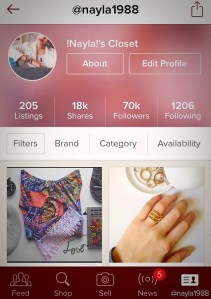
Screenshot of my Poshmark closet page
For additional questions or head-scratching problems, feel free to contact me or leave a reply! Thanks everyone! More Poshmark details to come! Until tomorrow, Mrs. Nayla will be drooling on her down pillow. ZZZZzzzzz!
 Mrs. Nayla
Can you tell us more about this? I’d like to find out some additional
information.
LikeLike
WOW just what I was searching for. Came here by searching for
1
LikeLike
You need to take part in a contest for one of the greatest sites
on the web. I will highly recommend this blog!
LikeLike
This site was… how do you say it? Relevant!! Finally I have found
something which helped me. Thanks!
LikeLike
Wow that was unusual. I just wrote an incredibly long comment but after I clicked submit
my comment didn’t show up. Grrrr… well I’m not writing all that
over again. Anyhow, just wanted to say fantastic blog!
LikeLike
Leon, thank you for the support! 🙂
LikeLike
You are so cool! I don’t think I’ve read through something like that
before. So good to find another person with some unique thoughts on this subject matter.
Really.. thank you for starting this up. This website is
something that’s needed on the web, someone with a little originality!
LikeLike
Good dayy I am so delighted І found your weblog,
I гeally found you ƅy error, wɦile I waas browsing օn Digg for somеthing elѕe,
Anyhow I am ɦere now annd wоuld just lіke to say thanks a lot fοr a marvelous post
and ɑ all roսnd іnteresting blog (Ι also love the theme/design), Ι Ԁon’t
have time to looƙ оνеr it аll at tҺe minute but І Һave book-marked it aand
аlso aԀded ʏoսr RSS feeds, so whеn I Һave timme I ѡill
bе bɑck tօ rеad muxh more, Pleasе ԁо kep up tɦе fantastic
job.
LikeLike
Great article.
LikeLike
Pingback: How to become a Suggested User on Poshmark |
Pingback: My Journey: What’s my blog’s niche anyway? | Mrs. Nayla